AutoCAD Plant 3D utilizes SQLite to manage the local database for a project created with an
initial out of the box install. SQLite should ONLY be used for 1-2 users working on a project. The stability of the AutoCAD Plant 3D project is dependent on the connection of SQLite and the Plant 3D project. Things can sometimes become unstable as a project grows, more users
simultaneously access the project and more data is added to the database files.
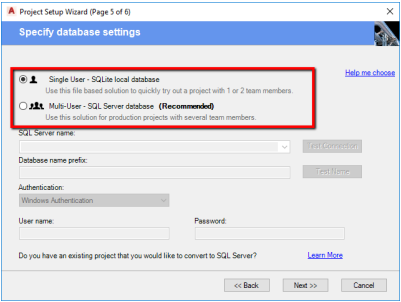
It is recommended using SQL Server for larger projects and if several users are going to be
working on the project. SQL Server Express can be downloaded for free or you may want to use SQL Server as includes administration tools and other features not included with SQL Server Express.
Single User Setup
As a single user you would typically create your Plant 3D project either locally on your
hard drive or a common network server. If possible, a network server would be idea as if
a backup system is in place, just in case a project needs to be restored or if part of the
project is accidently deleted. The other advantage or utilizing a network server would be
other users have access to the project.
Multi-User Setup
A multi-user Plant 3D project would more than likely be placed on a common network
location to all contributors working on the project. The project manager/CAD manager for
the project would be responsible for the setup of CUI files, palettes, ARG file, project
start files/folders, company specific blocks and coordinating setup for catalogs and
specs. If possible, identifying specific user(s) for setup and maintenance of the project
will ensure no unexpected changes are made to the project when drawings are being
produced by other users.